
 |
Home |  |
Screenshots | |
Download | |
Order | |
Blog* |  |
Support | |
 |
User Guide |  |
Style | |
Tab Grouping | |
Add-ins | |
It is a common convention to have interface file names started with 'I' (like IService.cs) and implementation files named the same excluding the first 'I' (like Service.cs). Would be nice to have them on one tab. It is easy to group such files, the problem is how the result looks like. For example, a possible title grouping regex for this task is:
(?<Ext>I(?<Name>.+?)\.cs)|(?<Name>(.*[/\\])?.+?)(?<Ext>\..+)
It nicely groups two files as "Service .cs IService.cs", but when IService.cs is the single file in a tab it will be displayed as "ServiceIService.cs" (and IInterface1.cs will be displayed as "Interface1IInterface1.cs"):
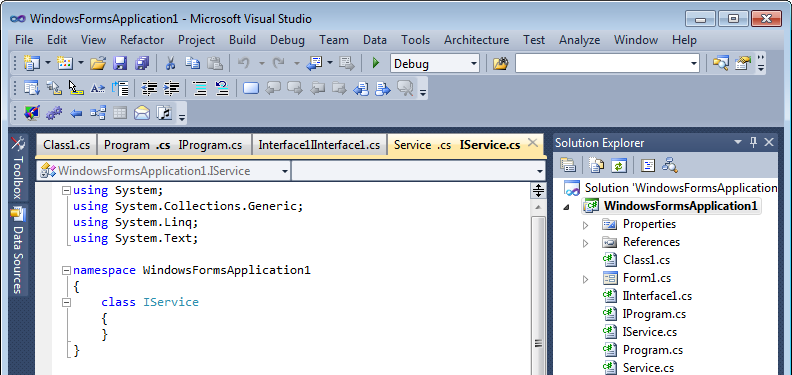
The ITransform add-in improves interface tab name representation, transforming interface titles after grouping. With this add-in for the IService.cs and Service.cs pair a grouped tab will be "Service .cs Interface" and a single interface tab will remain "IService.cs":

ITransform still requires setting up the special interface grouping regex first. Add the following title grouping regex section:
I(?<Name>[A-Z].+?)\.(?<Ext>.+)
For example, if you use default title grouping settings, your combined title grouping regex will be:
I(?<Name>[A-Z].+?)\.(?<Ext>.+)|(?<Name>(.*[/\\])?.+?)(?<Ext>\..+)
ITransform also supports other prefixes and lets you customize how to display interface tabs:

Interface regex should match only tabs with our prefixes. Replacement regex can be for example only ${Prefix} or include your custom text.
Rename regex with 3 replacement rules separated by ; can look like this:
\.scss$/Stylesheet;\.html$/Template;\.spec\.ts$/Tests
Return to Add-ins
Copyright 2009 - 2026 Vlasov Studio (Visual Studio extensions and tools)